

Regular backups are essential for protecting your data. They safeguard personal files, work documents, and photos. However, many users notice that backups take up far more space than expected.
The reason is simple: backups often include folders you do not really need. For example, movies, downloads, old projects, or temporary files can easily end up in your backup. As a result, storage fills up quickly. Backups also run slower, and managing data becomes more complicated.
Why exclude folders from your backup?
When you exclude unnecessary folders, your backup immediately becomes more efficient. Here is why this matters:
- Save storage space by avoiding files that do not matter.
- Speed up backups since fewer files are included.
- Reduce costs if your cloud plan has storage limits.
- Stay organized with only relevant data.
- Focus on important files instead of clutter.
In other words, folder exclusion helps you back up smart instead of copying everything blindly.
ElBackup gives you full control
With ElBackup, you decide what gets stored. The platform supports multiple services. In addition, it lets you exclude folders that contain data you do not need. This flexibility makes your cloud backup faster, lighter, and easier to manage.
How to exclude folders in ElBackup
ElBackup makes it simple to control your backups. For example, let’s take Google Drive:
- Open your Google Drive backup in ElBackup.
- Go to Settings.
- Select Advanced settings.
- View the list of folders in your Google Drive.
- Check the ones you want to include. Uncheck folders like Downloads, Movies, or Temporary files.
After saving these settings, your backup will only include the folders you selected. Therefore, it runs faster, uses less storage, and protects only the data that matters most.
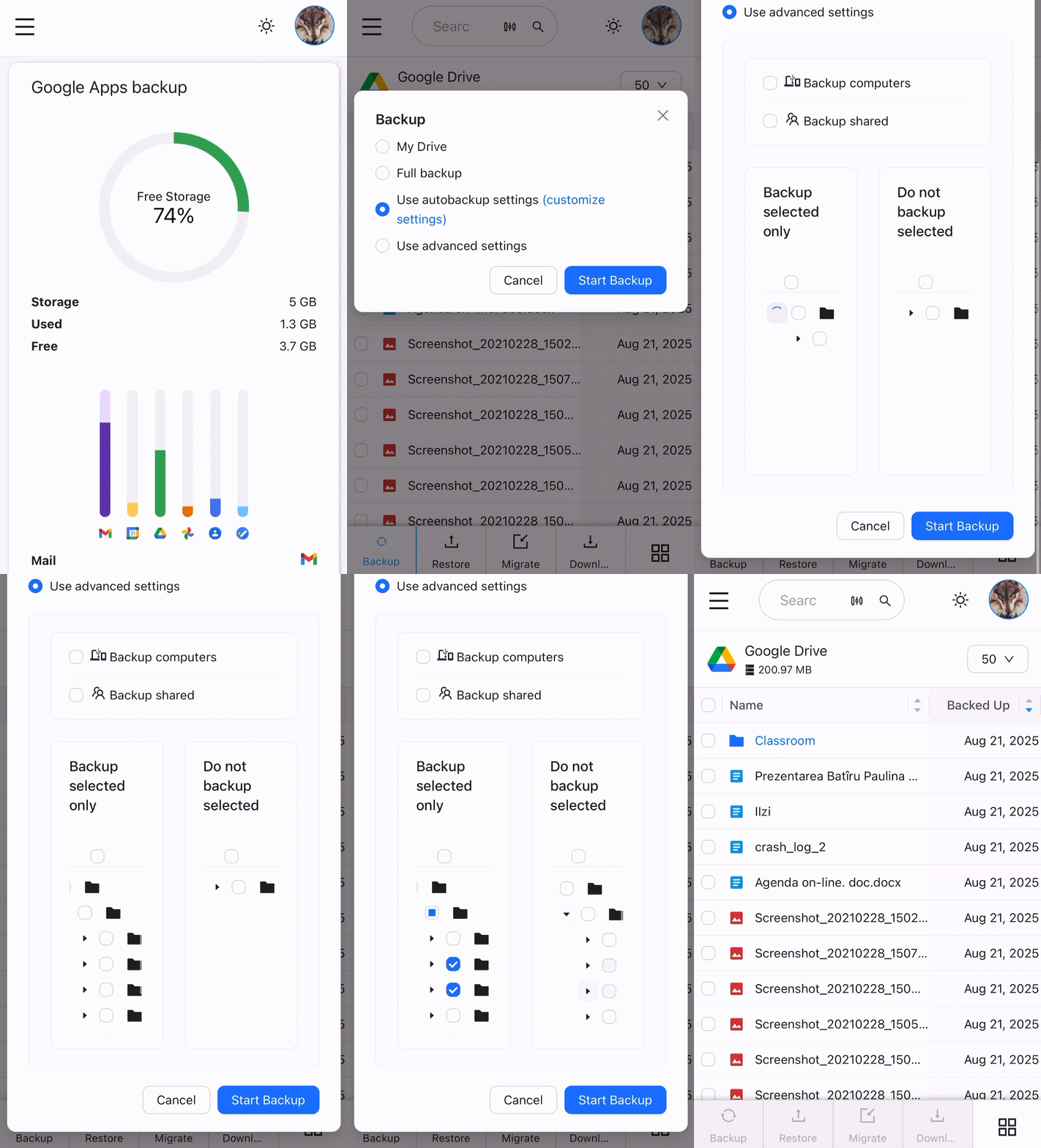
After saving these settings, your backup will include only the folders you selected. This way, your backup runs faster, uses less storage, and protects only the data that matters most.
Smarter cloud backups with ElBackup
Every good backup solution should give you both control and flexibility. With ElBackup, you can exclude unnecessary folders, save storage, and focus on what is important. Instead of wasting resources, you keep your backup clean, fast, and efficient.
ElBackup helps you back up smart by keeping only what is valuable and leaving out the rest. Find out more at ElBackup.com.